YouTube Shorts Thumbnail Safe Zone: Free Template (2026)
Shorts thumbnails play by different rules than regular video thumbnails. The frame is vertical (9:16), the UI covers different areas, and your thumbnail shows up in places — the Shorts shelf, your channel's Shorts tab, search — where YouTube overlays text right on top of it.
Here's exactly where the danger zones are, with a free overlay template you can drop into any editor.
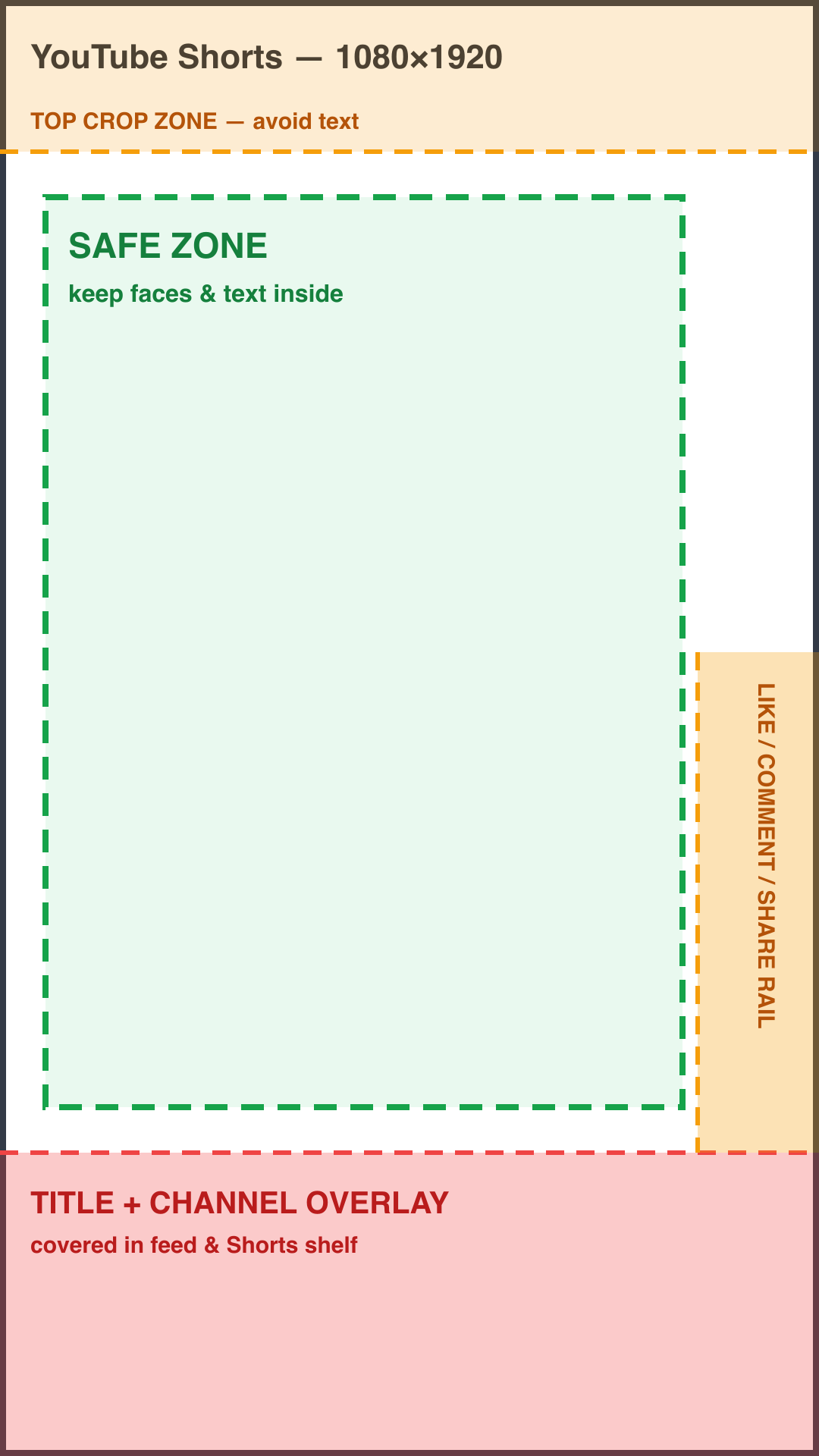
Download the free 1080×1920 overlay template (PNG) — transparent background, drop it as a top layer in Photoshop, Canva, or any editor.
Shorts thumbnail size: 1080×1920
Shorts use a vertical 9:16 frame — 1080×1920 pixels is the standard. If you upload a custom thumbnail from YouTube Studio on desktop, use exactly this size; if you pick a frame from the video, the same zones apply to whatever frame you choose.
The three danger zones
1. The bottom ~400px: title and channel overlay
In the Shorts shelf and feed surfaces, YouTube lays your video title and channel name directly over the bottom of the thumbnail, usually with a dark gradient behind it. Any text you put in the bottom fifth of the frame will be buried. This is the single most common Shorts thumbnail mistake.
2. The right ~160px: the action rail
During playback — which matters because your first frame often acts as the visual — the like, dislike, comment, share, and remix buttons stack down the right edge. Keep faces and text away from the right rail area, especially in the lower half.
3. The top ~200px: crop and system UI
Some surfaces crop the top of the vertical frame, and on-device status bars can overlap it. Treat the top strip as background-only space.
The safe zone
Keep faces, text, and anything you need viewers to see inside the central area — roughly 60px in from each side, below the top 200px, and above the bottom 400px. That's the region the green outline marks in the template. Center-weighted compositions survive every Shorts surface: shelf, grid, search, and playback.
Shorts vs. regular thumbnails: the key differences
| Regular video | Shorts | |
|---|---|---|
| Aspect ratio | 16:9 (1280×720) | 9:16 (1080×1920) |
| Biggest danger zone | Bottom-right (timestamp) | Bottom ~400px (title overlay) |
| Second danger zone | Corners | Right rail (~160px) |
| Where it's seen | Everywhere | Shelf, Shorts tab, search |
For regular 16:9 videos, see the main YouTube thumbnail safe zone guide — it has its own overlay and template.
How to check your Shorts thumbnail
- Design at 1080×1920 with the overlay template as your top layer.
- Keep the message readable at small size — Shorts tiles in the shelf are tiny; if your text doesn't read at 100px wide, simplify.
- Put the hook in the upper-middle: face and 2–4 words of text in the green zone, background everywhere else.
Making the thumbnail itself is the slow part — the YouTube Inspiration tool can generate one in a proven style with your face and text placed inside safe bounds.
FAQ
What size should a YouTube Shorts thumbnail be?
1080×1920 pixels (9:16). That's the full vertical frame; keep key content in the central safe zone since YouTube's UI covers the bottom and right edges.
Why is my Shorts thumbnail text covered?
Almost always because it sits in the bottom fifth of the frame, where the Shorts shelf overlays the video title and channel name. Move text up into the central zone.
Can I set a custom thumbnail for a Short?
On desktop YouTube Studio you can upload a custom thumbnail for a Short at upload time; on mobile you select a frame from the video. Either way, the same safe-zone rules apply.
Does the regular thumbnail safe zone apply to Shorts?
No — the 16:9 timestamp rules don't map onto the vertical frame. Shorts have their own overlay zones (bottom title bar, right action rail, top crop), which is what the template above marks.
Make your next thumbnail with AI
Paste any YouTube link. Get that thumbnail's style — with your face, your topic.